Showing posts with label opera. Show all posts

Wednesday, March 30, 2011

Now Turn to HTML5- web experience and Gaming

I just upgraded my firefox to 4.0. After installation on the start up page there was something flashy icon which brought me to this link https://demos.mozilla.org/en-US/?WT.mc_id=s4&WT.mc_ev=click

Ahh! more flashy inside. :)
I remember those days when I was kid and used to go cyber to play the miniclip games. It had most of the best flash games at that time. Small flash games would load in an instant, then the bigger ones lagged or took long times to open. Still there are many flash games available on the web.

So those things on the flashy website are made by HTML5, which I exactly don't know what it means but are great. No need to to install additional softwares like for the flash you need to download a flash player.


This website only requires you to have HTML5 supported web browser(new versions of Mozilla Firefox, Opera, Chrome, Safari, IE9). The best part is you can even run it on your mobile phones. Why it is that a best part? That means you can even play HTML5 games built for mobile phones. Anyway the performance in the HTML5 website directly depends on the browser you are using and having a better GPU(Graphics Processing Unit) also helps.

Think flash is still better ? Think again after viewing this website http://html5games.com/
https://demos.mozilla.org/

Get to know HTML 5 better:
http://en.wikipedia.org/wiki/Html5
http://www.html5rocks.com/

Meanwhile, Firefox 4 rocks. Mmm and Opera super rocks(hope \/,)

Friday, March 5, 2010

Probably the Fastest browser on Earth! Opera Launches 10.50

http://www.opera.com
The New Opera 10.50 has now been released officially. Previously it was it testing phases.
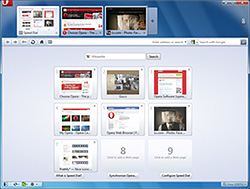
So Chromie!, came to my mind on the first sight, and why not? Like in chrome the tabs bar is on the top of the window followed by address bar. The menues are nicely arranged in on button with "O" on the top left. It feels good, I must say. The design looks great on vista or windows 7 and looks a bit weired on windows XP.


What the hell!! Blues!

It is said to have greater advantage over other browsers on the JavaScript based websites. It delivers a noticeable performance boost on JavaScript-intensive websites. This change is significant and marks a philosophical shift for Opera, one that puts the browser in a stronger position for the future. However some experts explain that safari and chrome still give better performance than opera which beats Firefox.


Another major addition in 10.50 is support for private browsing. Opera's implementation is a bit more clever than the one in Firefox and Chrome. In addition to being able to create a private browsing window like Chrome's incognito mode, users also have the option of creating a private browsing tab without needing to open a whole separate window. Private browsing tabs are marked with a special privacy favicon that makes it possible to tell them apart from regular tabs.

Could not find much glitter on the windows XP. Though in Vista or Windows 7 it has Aero Glass, as well as supporting Aero Peek and Jump Lists. You can also access your speed Dials and tabs from the taskbar.

Also to note there is a new tab called Follower tab.  I still could not figure out what does it do at all.

Opera is available on Windows, Mac and Linux. Download it from http://www.opera.com

Wednesday, February 24, 2010

Have you seen the Opera Unite? It really Rocks.

Been long that opera had been recommending me to upgrade my Opera 10 to 10.10. Today I just gave it a go. And holy cow, it was all worth it. There is a new menu on the Panels name "unite". The file sharing feature, Fridge, Media Player, Messenger, Photo Sharing and a WEB SERVER.

The last one caught my eyes. WTF! my computer a server?? Hell Yeah. I cannot get the perfect word to describe the New Opera Unite. Just fabulous, wonderful. The server did worked fine too. I loved this part very much.

I was a little pinched with the media player that when I play a song another song starts to play. Even if I stop it it doesn't stops. And I need to go to the playing song and stop it in there. Must have been a bug but the interface is really good.

Oh sorry not to tell you, the media player plays songs from your computer and can be shared with your friends on Opera(not any others). Also the messenger feature is available to only Opera users. For Yahoo!, MSN would have been a great boon. Anyway no problem with those.

The file sharing feature is also great. I don't know if my computer need to be ON to download the shared file from other computer which I suppose must be. It must be like your computer is a file server now...

There is also a Fridge menu. I could not figure out what it does exactly because till  now I have no friends on Opera. They say its for notes that your friends or family writes for you like "Lunch on 9am". Must be a good application to connect and help friends.

And what is this??? More applications?? There are loads of Opera Unite applications over there. Oh I can't get to them all now. I will be writing about them time to time.

If you have used Opera Unite share with us some worthy applications. I saw the webcam there.