Showing posts with label firefox. Show all posts

Wednesday, March 30, 2011

Now Turn to HTML5- web experience and Gaming

I just upgraded my firefox to 4.0. After installation on the start up page there was something flashy icon which brought me to this link https://demos.mozilla.org/en-US/?WT.mc_id=s4&WT.mc_ev=click

Ahh! more flashy inside. :)
I remember those days when I was kid and used to go cyber to play the miniclip games. It had most of the best flash games at that time. Small flash games would load in an instant, then the bigger ones lagged or took long times to open. Still there are many flash games available on the web.

So those things on the flashy website are made by HTML5, which I exactly don't know what it means but are great. No need to to install additional softwares like for the flash you need to download a flash player.


This website only requires you to have HTML5 supported web browser(new versions of Mozilla Firefox, Opera, Chrome, Safari, IE9). The best part is you can even run it on your mobile phones. Why it is that a best part? That means you can even play HTML5 games built for mobile phones. Anyway the performance in the HTML5 website directly depends on the browser you are using and having a better GPU(Graphics Processing Unit) also helps.

Think flash is still better ? Think again after viewing this website http://html5games.com/
https://demos.mozilla.org/

Get to know HTML 5 better:
http://en.wikipedia.org/wiki/Html5
http://www.html5rocks.com/

Meanwhile, Firefox 4 rocks. Mmm and Opera super rocks(hope \/,)

Tuesday, January 12, 2010

The Add-ons Eco system on Firefox - Second

AdBlock Plus
If you think your productivity is being hampered by the extra download time of those irritating ads or you just plain find them annoying while browsing the internet, this extension eliminates almost all ads from most web sites. When you start the extension for the first time, you can subscribe to a block list. Also, if you find out later that an ad that should be blocked, isn’t, you can add it manually or even add them on a generic pattern basis. You can also white-list any content you really need but has been mistakenly blocked by AdBlock as an advertisement. This extension gives you a much cleaner and leaner webpage to browse through. To get relieved from ads, download the add-on from https://addons.mozilla.org/en-US/firefox/addon/1865.


Download Status-Bar

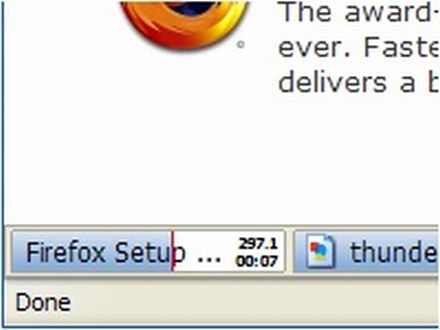
Simplicity is the USP of this extension. It creates a coloured status bar for all your downloads and the progress is depicted by filling the tab icon in the status bar. It auto hides when not in use and does its job very well. You can pause and cancel a download by clicking on the status bar. Very useful with Windows 7, because with auto-grouping, your download tab is hidden from direct view and repeatedly having to check it to monitor your download progress can be inconvenient. The download status bar supports multiple downloads at once and automatically assigns a different coloured progress bar to each for easy tracking. Get it from: https://addons.mozilla.org/firefox/26/.


Similar Posts.
http://likeweb.blogspot.com/2010/01/add-ons-eco-system-on-firefox.html
http://likeweb.blogspot.com/2010/01/add-ons-eco-system-on-firefox-second.html
http://likeweb.blogspot.com/2010/01/add-ons-eco-system-on-firefox-third.html
http://likeweb.blogspot.com/2010/01/add-ons-eco-system-on-firefox-fourth.html

Wednesday, January 6, 2010

The Add-ons Eco system on Firefox

Firefox is a good browser, but it is the Extension Eco System that makes it a great browser. Extensions allow you to add functionality and convenience to your Firefox install and help you enjoy flawless browsing. So here is our top ten list in no particular order.


FoxTab
Think of it as Windows’ Aero/Linux’s Compiz/Mac’s Expose in your browser. You can preview and then open all your tabs via this extension in various 3D Views. You can select from six different views to display the tabs. One interesting and very useful feature is you can switch to Foxtab view (if you have multiple windows open with multiple tabs in each of them) and it will show all the tabs from all the Windows for easy switching in full 3D glory. If you find yourself frequently working with more than 20 tabs, some of which were opened a few hours before and have difficulty in remembering what is there in what, this extension should significantly reduce your neural processing load. You can download FoxTab from https://addons.mozilla.org/en-US/firefox/addon/8879

GreaseMonkey
While shopping at Ebay US or any other site, you would’ve wished the prices were displayed in rupees instead of US dollars; or there were no adds or sponsored results on the Google search page. May be even Google image results open directly as the full size image. This extension is the genie’s reply to all that and more. This extensions allows you to customise a web page on the fly based on small bits of Java scripts that can be downloaded according to what you want from   userscripts.org .

With the aid of this extension you can make your choosen web sites fit exactly into your desired mould. For instance, you can add video download functionality to video sharing site like youtube, OR disable all ads on myspace OR change the appearance of gmail and lots lots more…With the a strong and large user base, you can be assured of customisation, in the form of a user script. To get this add-on, go to https://addons.mozilla.org/en-US/firefox/addon/748.


Similar Posts.
http://likeweb.blogspot.com/2010/01/add-ons-eco-system-on-firefox.html
http://likeweb.blogspot.com/2010/01/add-ons-eco-system-on-firefox-second.html
http://likeweb.blogspot.com/2010/01/add-ons-eco-system-on-firefox-third.html
http://likeweb.blogspot.com/2010/01/add-ons-eco-system-on-firefox-fourth.html