Tuesday, October 4, 2011

imo.im Instant messenger for all the Networks

 http://imo.im
Well most of the networks, imo.im is a great browser based, desktop and mobile based application(iPhone, iPad, Android, Java) to chat with your multiple networks of friends. AIM, Facebook, GTalk, ICQ, Jabber, MSN, MySpace, Skype, Yahoo, Hyves, Steam and VKontakte are the current networks imo.im supports.

https://imo.im/download.html - For the Windows
You can Instantly Login through any of your username and add other later.
When you login with skype you may also want the video chat feature, and guess what you have it. Though it doesn't incorporates with the original skype video chat, it actually has its own. You can also do video chat with your contacts in facebook, msn, yahoo and other networks. When you do video chat with one of your contacts imo.im send a link to your contact and when he/she clicks the link he will be sent to a video chat page, thus you can do the video chat.

You can even play games with you contacts. When you select a game a link will be sent to you and ur contact. Visiting the link will let you both play the game.

Try yourself this great new Instant Messenger.

Tuesday, September 13, 2011

Convert your documents (pdf, doc, txt and more) to your Language

Google docs is a great application, you already know that. There are numerous features available on Google Docs. For starters if you haven't noticed the small 'Translate Document' from the 'Tools' menu, this is the right place to know. You can translate files like pdf, doc, txt, html, xls, docx.

You can translate you documents in two ways :
1. Google Translate
The link translate a document can translate you documents fast and easy.

2. Google Docs
So there is Google translate to translate your documents but why use Google Docs? If you just want to translate you document then Google Translate will suffice, but with google docs you can edit your documents. The ability to edit pdf files is the most exciting because there aren't much of free and easy to use pdf editors out there. To edit your pdf files you first need to upload them and convert them to google docs. You can do it as
Select a pdf file to convert  > Actions > Made a google docs copy. 

After you have made a copy then click on it. You will be taken to editing mode for that document. From the page in menus >Tools>Translate document. Then choose your language to translate the document into.
You can create a copy of the translated document, download to you computer.


Sunday, September 4, 2011

Read Ebooks on Albite Reader Free

Albite reader 2.1
Albite reader 2.1 is a free Ebook reader. Just the one I was looking for. It runs in a java enabled phone or a symbian(nokia) phones. Albite reader supports both smartphones and low end phones capable of running java apps. I am using it for corby pro and it's the best app for me right now. The reader supports epub,txt and (x)html file format. You can get free epub books from 

So on my mobile, it support touch. The touch sense is great on this app. Some features of Albite reader are :
1. Touch support with different functions for touch and touch hold.
2. Night and day mode makes reading easy.
3. Increase or decrease text size.
4. Select text in the book and Look up a word in the dictionary (normal and HD version)
5. Clear and clean interface
6. Close and start from previously reading page.
7. Supports images and text styles(bold, italic, alignment).
8. Supports Dictionary (Dictionary doesn't comes with the app, but other dictionaries can be integrated).

Albite Reader interface

The supported phones are as follows:
Albite READER HD 2.0.12

Nokia N8-00, Nokia E7-00, Nokia X6-00, Nokia C7-00, Nokia C6-00, Nokia C5-03 ,Nokia 5800 XpressMusic, Nokia 5530 XpressMusic, Nokia 5250, Nokia 5230 Nuron, Nokia N97

Albite READER No Touch 2.0.12

Nokia X5-01, Nokia E5-00, Nokia C5-00, Nokia N96, Nokia N95, Nokia N91, Nokia N85, Nokia N80, Nokia E72, Nokia E61, Nokia E50, Nokia 6760 slide, Nokia 6720 Classic, Nokia 6710 Navigator, Nokia 6220 Classic, Nokia 6124 Classic, Nokia 6120, Nokia 5730 XpressMusic, Nokia 5700 XpressMusic, Nokia 5630 XpressMusic, Nokia 5500 Sport, Nokia 5320 XpressMusic, Nokia 3250, Sony Ericsson J105i

Albite READER Light 2.0.12

Nokia 3720 Classic, Nokia 5130 XpressMusic
Albite READER 2.1
Samsung GT-S5230 (Star), Samsung Impression

Though your phone might not be listed here but the similar types of phones will also work with this app. Like my Corby pro is not listed here but works flawless.

Wednesday, August 17, 2011

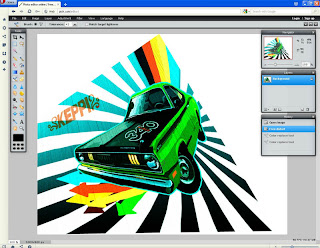
Photoshop on the web! -Pixlr

Pixlr
http://pixlr.com/editor/
Pixlr is a powerful free online Image editor. Peoples looking for a photoshop like experience on web will be just a home with most of the features imported from photoshop. There is the history viewer, layer mask, gradient tools, blurr/sharpen, filters and other tools from photoshop. The more advanced parts of photoshop aren't there but for a web image editor it is still a powerful and dynamic one out there.

You will need to have the latest version of adobe flash installed and java might be needed in some cases too(like in print screen paste).
You can also sign up for username and store your images on the web and edit them later. The images you edit can be saved in your computer, and also shared with social networks like facebook, picasa, Flickr.

You have option to edit photos from your computer, url or from your accout in pixlr.