Monday, August 24, 2009

How to make good conversations on Omegle?

When the Omegle first launched then everyone stormed into it, everyone were so excited. I too was excited for what was it. Talking to strangers even with their name as "stranger" was quite interesting. I got to talk with some pretty good strangers and had long conversations sometimes. But now as the days grew older the long conversations seems to fade away.

Now a days;

Stranger: hi
Stranger: have you checked Xanka on Bebo its fabulous http://apps.bebo.com/xanka
Stranger: they add new games every minute!
Stranger: sorry got to go now

This is the one I got recently and more
Stranger: My name is Claudia, u can see me here live on cam www.bloscos.com Im the first blonde

Omegle has now become home for spams. In every 10 conversations about 8 starts with these spams.

So how to make a good conversation on Omegle?
1. When you see the conversation starting with the above like sentences then just disconnect from the chat.
2. Just start with a simple "Hi" for instance. Even try this one "My name is ... what is ur name?", it might sound a bit geekish but it worked.
3. Don't wait too long for a response. If there is no respose then you can disconnect from the chat and start a new one.
4. If you get the response try talking about the possible topics of interest. Just get any random topic, and do change it if the conversation is getting boring.
5. Listen to what your stranger says and reply to it honestly as necessity. But don't give out ur personal information just yet.
6. Even making fun of your stranger is not bad for running a good conversation, though there is no gurantee the conversation will be long.
7. Can you disguise peoples? Try it to the stranger. If you are a man then try talking in woman ascent. I found talking as a woman is a good way for long and good conversations.
8. If the time comes where one of you has to go or you are ready to exchange contact information, think about starting with an email address.

Try them and they are not bad for health.

Wednesday, August 12, 2009

Skeweezelt - Convert any weblink to a mobile-friendly page

While Opera Mini is a great browser and serves all the required purposes, the problem with having a Windows Mobile interface is that for a lot of applications, links will still open in Internet Explorer by default.

Smartphone users are painfully aware of the shortcomings of IE, the biggest of which is opening a full size Web page.

Programmer John Cody of OmniSoft got tired of going through the same on his handset and decided to create a simple tool that should be put onto every single WinMob phone without a second thought.

The idea is simple: If you're opening any link - be it from an email in Outlook or from an RSS feed - Skweezelt will offer to compress the page to a mobile friendly layout, making it easy on your Internet Explorer.

However, you can still opt to view the original page if you so desire. When you click on a link, the application pops up and asks you whether you want to "Skweezelt". Choosing 'Yes' will perform the appropriate compression, while 'No' takes you to the default page as-is.

Now, installing Skweezelt is a bit of a tricky issue, as there's no CAB fire for the same. It requires a few simple changes in the the Windows Mobile registry, and we advise you do the same only if you're comfortable with it. Additionally, don't forget to back up the registry.

Thankfully you can see the detailed instructions on Omnisoft's forum, and even get replies to any trouble you may encounter.

Still, Skweezelt is definitely worth the one-time installation hassle: The page loads quicker, you save on bandwith, and it's easier to read. It's simply great!

Platforms: Windows Mobile
Price: Free
Download: http://www.omnisoft.com

Saturday, August 8, 2009

Things that you didn't know about Gmail

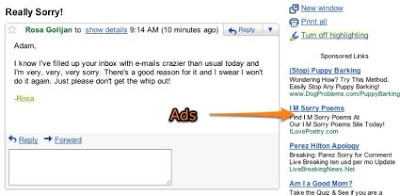
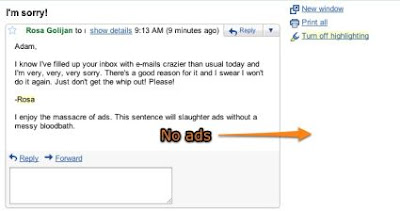
With just two simple sentences at the end of an email, you can now eliminate the ‘Sponsored Links’ that show up on the side of an email in your inbox.

The sentences were based on the logic laid forth by blogger Joe McKay, who wrote in a blog post on his site that all you need to do is mention catastrophes or tragedies in your mail for Gmail to not put up ads.

“Google does not use humans to read your email, only computers. These computers search for keywords that trigger the advertisements, however, if they happen to find a catastrophic event or tragedy Google errs on the side of good taste and removes the ads altogether,” McKay wrote.

While McKay’s suggestions were a bit too offensive, the guys at Lifehacker came up with their own phrases that were ‘safe’ to send to anyone.

So all you need to do is add these two sentences at the end of an email: “I enjoy the massacre of ads. This sentence will slaughter ads without a messy bloodbath.”

Before
After

“Those two simple (and innocent) sentences at the end of an e-mail appear to consistently block Gmail's sponsored ads for us. We've tested e-mails of varying lengths because Joe remarked that he found that there needs to be a ratio of one ad-blocking word for every 167 normal words, but so far, we haven't seen those sentences fail,” Lifehacker wrote.

HOW TO DISABLE THE SPONSORED LINKS BAR
McKay also notes how to disable the bar at the top of your inbox, which displays sponsored links. A lot of our tech-savvy readers might already know this one, but the Sponsored Links bar can be turned off simply through the Gmail settings itself.

Go to your settings page, click on ‘Web Clips’ and uncheck the box for “Show my web clips above the Inbox”.

That’s it! You now have an ad-free Gmail inbox.

Of course, Mozilla Firefox users could always just use the AdBlockPlus extension and disable all of the annoying sponsorship nonsense directly…

Facebook -- Simple Plan Best time pass

http://apps.facebook.com/mindjolt/games/crazy-taxi
ATTENTION: This game is highly addictive.
I really don't know how to give it a good phrase "Simple plan for Best time pass", not bad i guess. I would love to hear from you guys. Here's what is it for. The "Crazytaxi". By just viewing the starting part (main menu) of it you can't guess what it is made of. Although not made of steel, you will stick to it at least for 2 hours a day.

Even look at the pictures. They don't have the icandies; just a flat car..., only kids will play this game..., ain't that what you are thinking?? Even when you play the game it has only flat animations like the car flips left right so much like the old flash games.

The game control is simple. You can move left, right and jump. You accelerate with up arrow and reverse with down arrow.

On the first you start with WTF is this game. Then you make a score, you find out you are last ranked by the score. You will want to increase it to better. The new score is a little better, why not make it ever more better. Well the thrust of being better makes this game so special; and also this simple game is able to do it in the most effiecient way. Eventually you won't want to leave this game untill you finish on the top ranking or either you die playing the game.

The scores are updated frequently and shows the high scores on your friends list and also the world wide rankings. It will be quite a while when you make through the world wide rankings.

No more words. Great game, play to see.